# Print Order with Avis option using Vify: Order Printer
By default, Avis stores option selections in **order properties**. However, Shopify’s built-in order print and invoice templates do not display this field (**line\_item\_properties**).
As a result, to show Avis option details on invoices or printed documents, you’ll need to use a **third-party order printer app**.
No worries — the recommended app in this case offers a **free plan**.
{% hint style="info" %}
Install [Vify order printer](https://apps.shopify.com/vify-order-printer?utm_source=Avis\&utm_medium=chat%20recommendation\&utm_campaign=partnership)
{% endhint %}
***
## How to Show Avis Option Details in Vify Order Printer
### Step 1: Open the template editor
1. In Shopify admin, open **Vify Order Printer**
2. Go to the **Template** tab
3. Click **Edit** on the template you want to use (Invoice, Packing Slip, etc.)
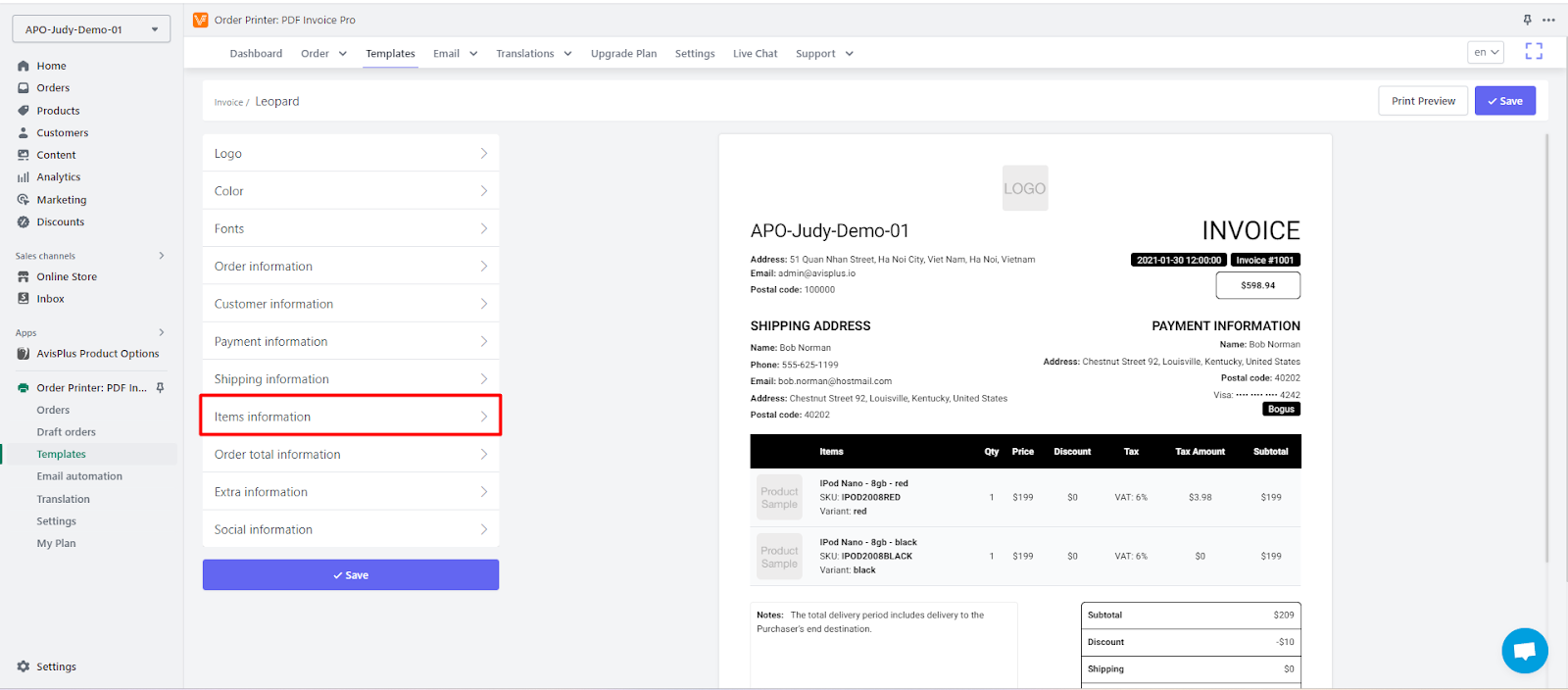
### Step 2: Open “Items information”
1. After entering the template editor, look at the left-side menu
2. Select **Items information**
### Step 3: Enable “Show properties”
1. In **Items information**, find the option **Show properties**
2. Toggle it **ON**
This setting allows Vify to display **line item properties**, where Avis stores option data.
### Step 4: Save and verify
1. Click **Save**
2. Open a sample order that contains Avis options
3. Preview or print the document to confirm option details are shown correctly
***
### Need help?
If you need help setting this up or don’t see option details after enabling **Show properties**, please contact our support team.
📩 **Support:**